Jira DC to Cloud Migration: How to Preserve App Data When JCMA Changes IDs
A practical guide to migrating Jira app data when Active Objects don’t transfer and all entity IDs change
How to Preserve App Data
When migrating Jira from Data Center to Cloud using JCMA (Jira Cloud Migration Assistant), all entities receive new IDs. Issues, comments, attachments — everything gets a fresh Cloud ID. For Jira apps that store relationships (parent-child, links, references), this breaks everything.
This article explains a marker-based migration approach we developed for our Threaded Comments app — but the technique works for any Jira app that needs to preserve entity relationships across DC→Cloud migration.
The ID Problem
In Jira Data Center, every comment has a numeric ID (e.g., 10501, 10502). Our app stores thread structure in Active Objects:
Comment 10501: "We found a bug"
├── Comment 10502: "Which endpoint?" (parent: 10501)
│   └── Comment 10503: "POST /users" (parent: 10502)
└── Comment 10504: "I'll fix it" (parent: 10501)
After JCMA migration, these same comments get completely new Cloud IDs (e.g., 5001, 5002, 5003, 5004). The old 10501 → 10502 parent-child link becomes meaningless because comment 10501 no longer exists in Cloud.
What JCMA Doesn’t Migrate
JCMA handles core Jira data well, but it does NOT migrate:
- Active Objects data (where we store thread structure)
- Comment properties
- Custom app metadata
This means our parent-child relationships are lost during native migration.
Our Solution: Marker-Based Migration
Since we couldn’t rely on JCMA to preserve our data, we developed a marker system that “rides along” with the comments themselves.
Marker Format
We chose a visible text-based marker format:
:::VOTAZZ_MIG:10501:::
Yes, visible. We couldn’t make them invisible, and here’s why.
Why Not HTML Comments?
Our first idea was to use HTML comments <!-- VOTAZZ_MIG:10501 --> — they would be invisible to users but still present in the data.
In DC: HTML comments didn’t render (good — users couldn’t see them).
After JCMA migration to Cloud: HTML comments completely disappeared. Gone. The Wiki Markup → ADF conversion stripped them entirely because ADF (Atlassian Document Format) has no HTML comment node type.
- Users temporarily see
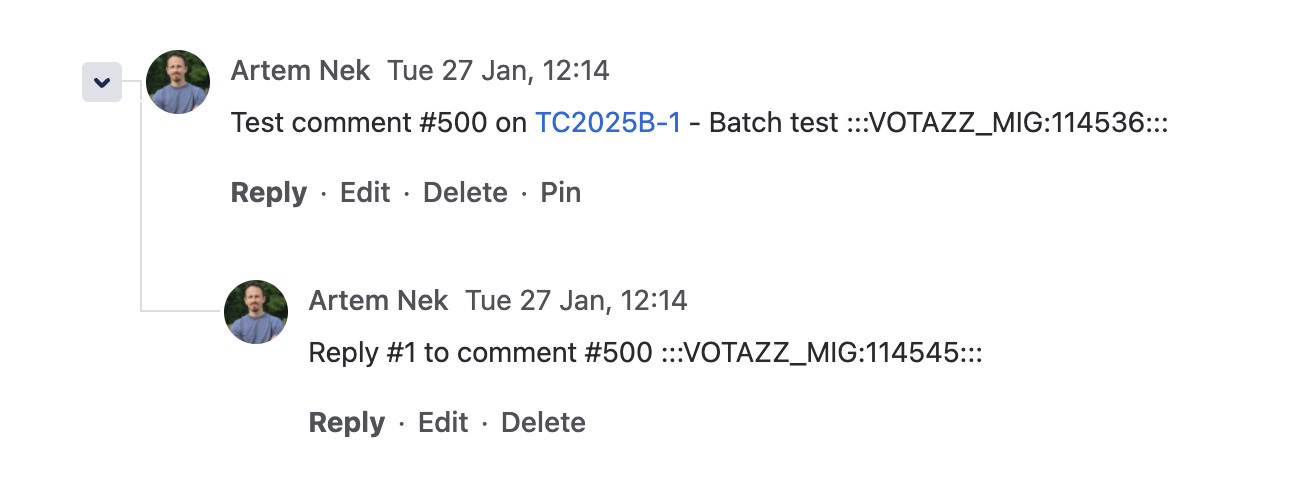
:::VOTAZZ_MIG:10501:::at the end of comments - But markers survive the migration intact
- We clean them up immediately after restoring thread structure
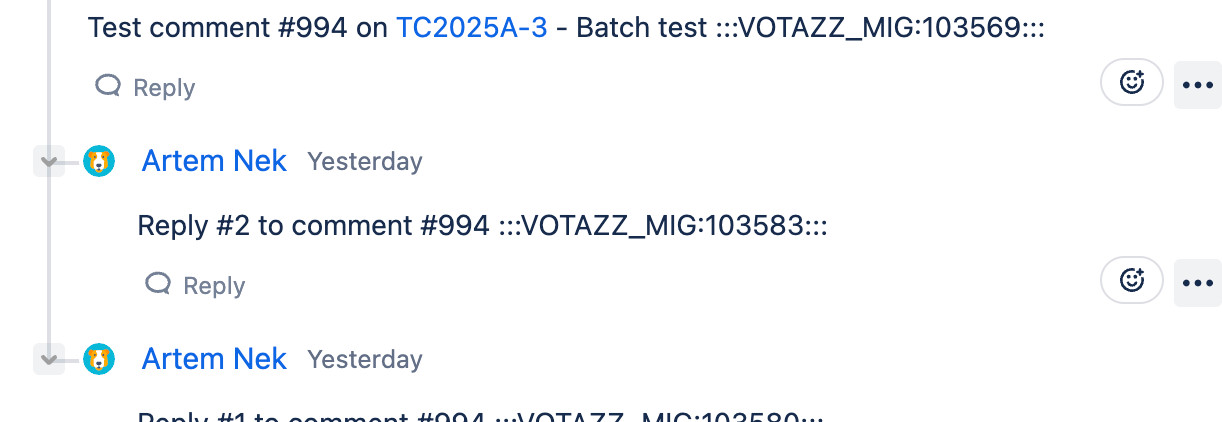
What Markers Look Like
In Data Center:
In Cloud (after JCMA migration, before cleanup):
The Migration Flow
1 Prepare in DC
Add markers to all threaded comments:
Before: "This is a reply"
After:  "This is a reply :::VOTAZZ_MIG:10502:::"
Simultaneously, export the hierarchy JSON:
[
  {"issueId": 10001, "commentId": 10501, "parentCommentId": null},
  {"issueId": 10001, "commentId": 10502, "parentCommentId": 10501},
  {"issueId": 10001, "commentId": 10503, "parentCommentId": 10502},
  {"issueId": 10001, "commentId": 10504, "parentCommentId": 10501}
]
2 JCMA Migration
JCMA migrates comments with markers intact. IDs change, but markers preserve the original DC ID.
| DC Comment ID | Cloud Comment ID | Body |
|---|---|---|
| 10501 | 5001 | “We found a bug :::VOTAZZ_MIG:10501:::“ |
| 10502 | 5002 | “Which endpoint? :::VOTAZZ_MIG:10502:::“ |
3 Restore in Cloud
Scan comments — find all markers, build dcToCloudMap:
dcToCloudMap = {
  "10501": "5001",
  "10502": "5002",
  "10503": "5003",
  "10504": "5004"
}
Transform hierarchy — convert DC IDs to Cloud IDs:
// Export says: 10502 → parent 10501
// dcToCloudMap: 10502 = 5002, 10501 = 5001
// Result: 5002 → parent 5001
Save to Forge Storage — store new parent-child relationships
Remove markers — clean up comment bodies
Technical Implementation
DC Side (Java Plugin)
We added migration endpoints to the DC plugin:
POST /migration/add-markers— inject markers into all threaded commentsGET /migration/export-data— export hierarchy JSONPOST /migration/remove-markers— cleanup after verification
Cloud Side (Forge App)
A dedicated migration module handles:
- Chunked upload of large migration data
- Building DC→Cloud mapping by scanning markers
- Batch processing with progress tracking
- Marker cleanup after successful import
Challenges Encountered
Building a migration tool on Atlassian Forge presented unique platform constraints that significantly shaped our architecture.
Challenge 1: The 25-Second Timeout
Every Forge function has a hard 25-second execution limit. This sounds reasonable until you consider what migration actually involves:
- A single Jira issue can have 4,000+ comments
- Each comment requires an API call to read its body and find the marker
- 4,000 API calls × ~50ms each = 200 seconds (8x over the limit)
Our Solution: Incremental Processing
Instead of processing everything in one call, we broke the work into small chunks:
// Process ~100 comments per resolver call
// Save progress to storage
// Frontend polls and triggers next chunk
while (hasMoreComments) {
  const batch = await fetchComments(startAt, 100);
  processAndSaveProgress(batch);
  if (approachingTimeout()) break; // Leave 5s buffer
}
The frontend continuously calls the resolver, each call processes a small batch and saves state. If the browser tab closes, progress is preserved — users can resume with “Continue Processing”.
Challenge 2: The 240 KiB Storage Limit
Forge Storage has a 240 KiB limit per key-value pair (official docs). Our migration export JSON for a medium-sized instance is 50+ MB.
Our Solution: Chunked Storage
We split data into chunks that fit within the limit:
// Upload: Split into 2000-record chunks (~170KB each)
const CHUNK_SIZE = 2000;
for (let i = 0; i < records.length; i += CHUNK_SIZE) {
  const chunk = records.slice(i, i + CHUNK_SIZE);
  await storage.set(`migration-chunk-${chunkIndex}`, { records: chunk });
}

// Store metadata separately
await storage.set('migration-meta', {
  totalChunks: chunkCount,
  totalRecords: records.length
});
Challenge 3: No Background Processing
Unlike traditional servers, Forge has no long-running processes. There's no cron job, no worker queue, no daemon that can churn through migration overnight.
Every action requires a user's browser to trigger it. If a user closes their laptop, migration pauses. Period.
Our Mitigation
- Clear UI messaging: "Keep this tab open during migration"
- Automatic state saving after each batch
- "Migration Interrupted" detection with one-click resume
- Browser-specific tips (disable sleep mode, keep tab visible)
Challenge 4: Rate Limits
During our development (January 2026), Jira Cloud enforced approximately 100 requests/minute for most endpoints. Combined with the 25-second timeout, this creates a delicate balance.
Note: Starting March 2, 2026, Atlassian is transitioning to a points-based rate limiting system. Our approach still works — we detect 429 responses regardless of the underlying quota system.
Our Solution: Graceful Rate Limit Handling
if (response.status === 429) {
  await saveProgress(currentState);
  return {
    rateLimited: true,
    waitUntil: Date.now() + 60000,
    message: 'Rate limited, will retry automatically'
  };
}
The Compound Effect
These constraints don't exist in isolation — they multiply:
| Constraint | Individual Impact | Combined Impact |
|---|---|---|
| 25s timeout | Can't process large issues in one call | Must chunk everything |
| 240 KiB storage | Can't store full export | Must manage dozens of storage keys |
| No background jobs | Requires browser to stay open | Users must babysit migration |
| Rate limits | Can't burst through data | Progress is throttled unpredictably |
A migration that would take 10 minutes on a traditional server can take hours on Forge — not because the code is slow, but because we're constantly working around platform constraints.
- Security — Runs in Atlassian's infrastructure, no customer data leaves their environment
- No hosting costs — We don't manage servers
- Automatic scaling — Atlassian handles infrastructure
- Marketplace compliance — Required for Atlassian Marketplace
Key Takeaways
Markers travel with content through any migration.
Comment properties don't migrate, but body text does.
Batch processing and chunked storage are essential for enterprise migrations.
Markers allow us to confirm mapping before cleanup.
The Bottom Line
The marker-based approach allows you to preserve entity relationships across the DC→Cloud boundary, despite the complete ID transformation that occurs during JCMA migration.
Forge constraints forced us to build a more resilient system: state is always persisted, operations are idempotent, and the migration can survive interruptions gracefully.
If your Jira app stores relationships between entities (comments, issues, users, attachments) — this approach can help you migrate that data when JCMA changes all the IDs.
Threaded Comments for Jira by Votazz