How many story points are under this Epic? What Jira search can and cannot tell you

Somebody asks how big an Epic really is. You search for its work items and get a list, but the number they want, the story points under the Epic, is not in that list. Here is what the search returns, where it stops, and how to check your own Epic in ten minutes.
See Issue Hierarchy Structure on the Atlassian Marketplace
The short version
- The JQL field
parentfinds the child work items of a parent work item. It supports=,!=,INandNOT IN, and Atlassian lists no functions for it. - A search returns work items. It does not add up their story points or time estimates.
- The
parentsearch works one parent at a time: to look one level further down you take the keys you got and search again. - So “how many story points are under this Epic, sub-tasks included” is a manual job: several searches and a calculator.
- Issue Hierarchy Structure shows the Epic as a tree and sums story points, time estimates and percent complete at every level, and exports the tree to CSV.
What the search gives you
Atlassian describes the parent field like this:
“Search for all child work items of a parent work item. For example, you can view all stories under the larger piece of work they belong to.”
and lists the details for the field: operators =, !=, IN, NOT IN, and under supported functions: “None”. The example on the page is parent = TEST-1234.
Source: Atlassian, Advanced search reference, JQL fields
A second field helps to tell the levels apart. hierarchyLevel uses 1 for the larger pieces of work above the standard level, 0 for standard work items such as stories and tasks, and -1 for subtasks. It filters by level. It does not sum anything either.
Check your own Epic in 10 minutes
- Pick a large Epic. Run
parent = EPIC-1with its key. Note how many work items come back, and look at the story points of each. - Look at the result: are the sub-tasks of those stories in the list? If they are not, copy the keys of the stories and run
parent in (KEY-2, KEY-3, KEY-4). That is the second level. - Add the story points by hand. Check which levels carry story points in your project: only stories, or tasks and bugs too.
- Count how many searches you ran and how many numbers you added. Then ask yourself how often someone asks this question, and how long the answer stays true.
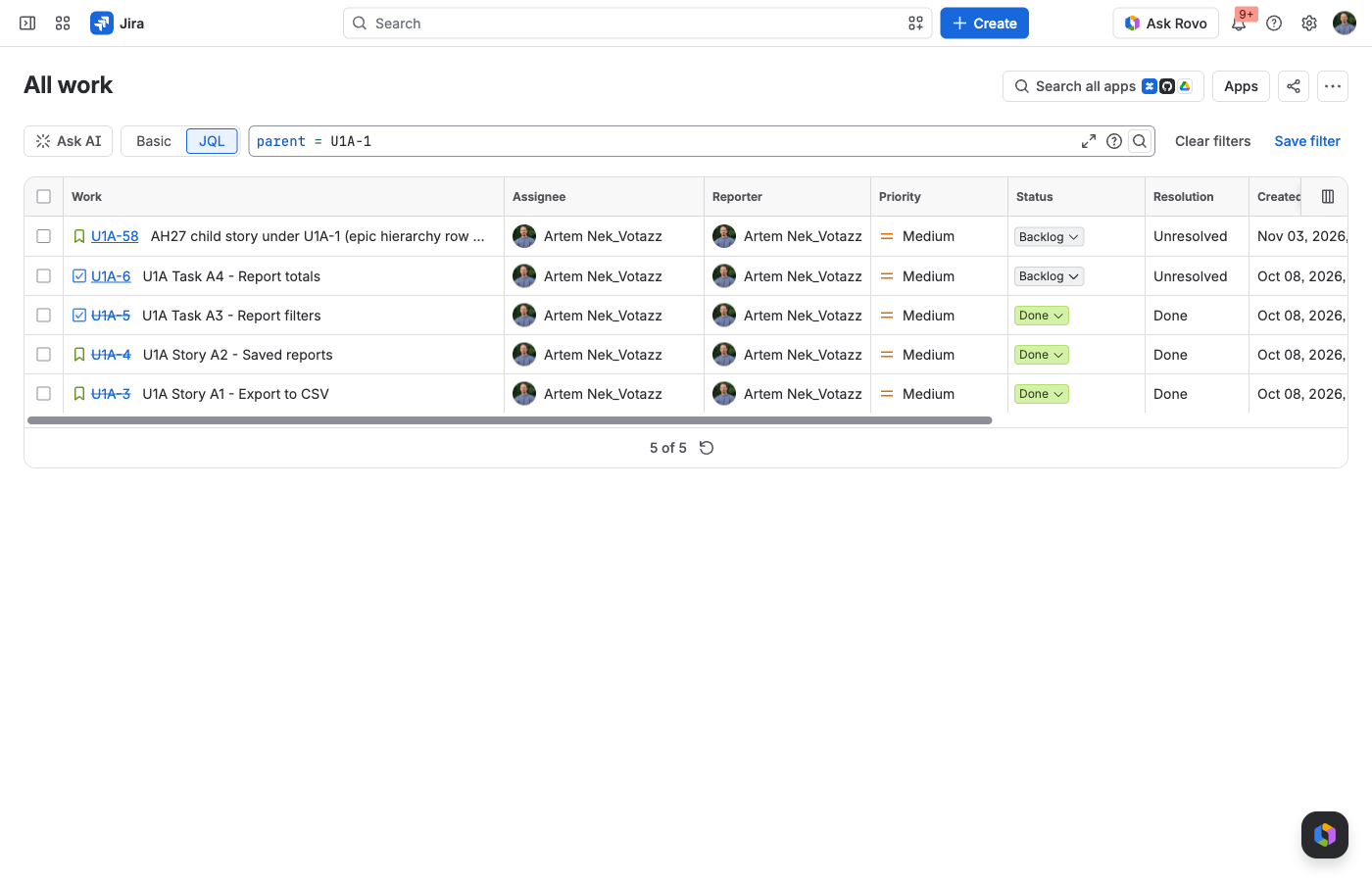
parent = U1A-1, 6 November 2026. Five work items come back, all one level below the Epic. The sub-task of Story U1A-1’s child is not in the list: it appears only in a second search, parent in (U1A-58, U1A-6, U1A-5, U1A-4, U1A-3).Meet Issue Hierarchy Structure
Issue Hierarchy Structure: Story Points Roll-Up Reports is a Votazz app. Open the Epic Hierarchy report from the Apps menu (or add the Epic Hierarchy gadget to a dashboard), pick a project and press Search. You get the Epics of the project as a nested tree, Epic, Story, Sub-task, with the estimates summed at every level: time estimates, story points and percent complete.
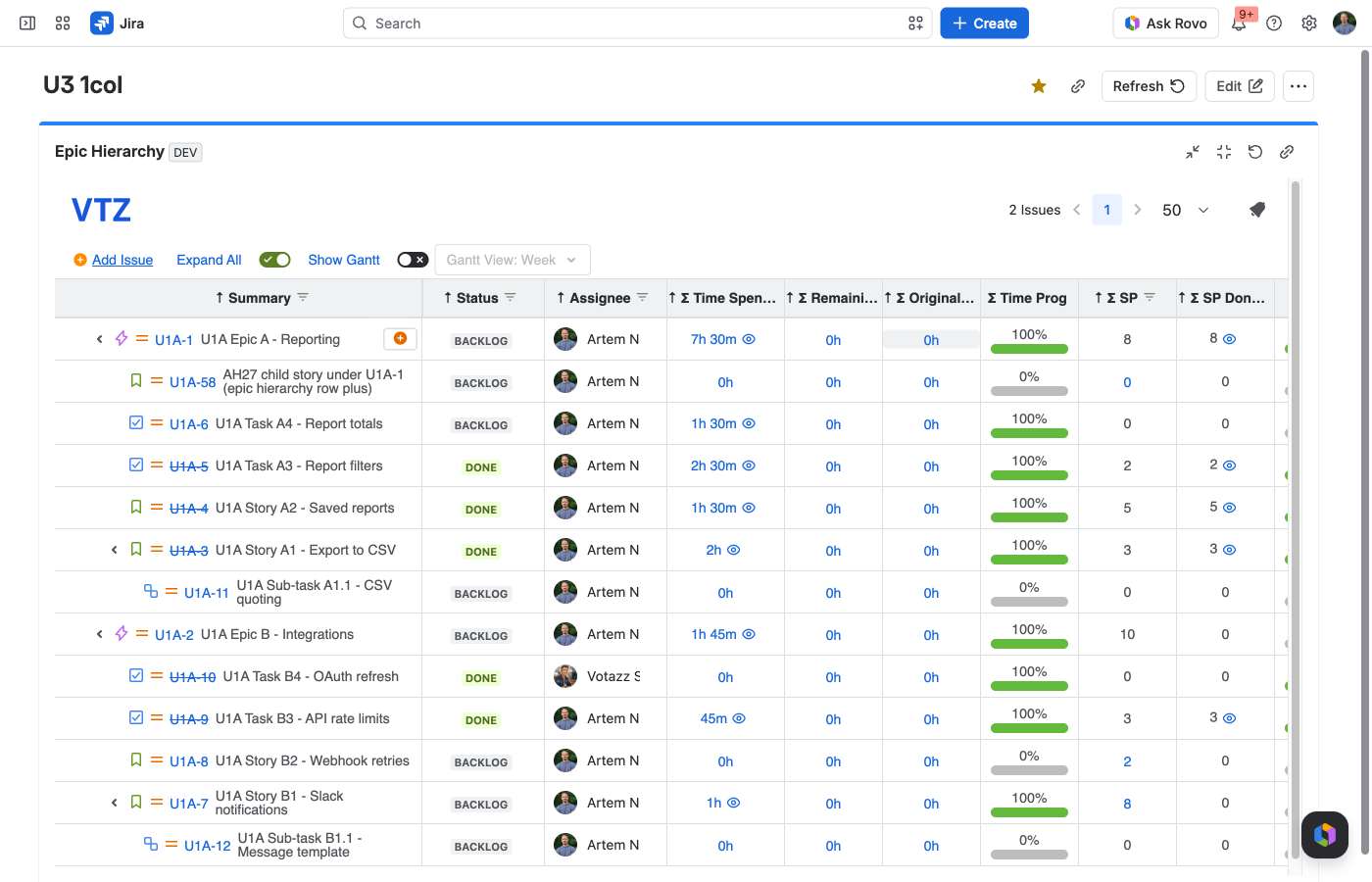
What you can do in the report:
- Filter by Project, Fix Version, created date, Status or Assignee, and load the Epics you care about.
- Edit the summary, status, assignee, estimates and story points right in the tree.
- Roll up any Number custom field, not only story points: add the field in the displayed columns and the app adds a Sum Up column.
- Follow issue links as a tree too: the Links Hierarchy report with Max Depth, child issue types and an option to include sub-tasks.
- See the hierarchy of the current Epic in the Activity section of the Epic itself.
- Put the tree on a dashboard as a gadget, or export it to CSV, which opens in Excel.
One rule is worth knowing before the first report. By default story points are counted for Stories and the levels above them, so a Task with its own estimate does not add to the Epic. If your team estimates Tasks and Bugs too, the app settings have an option to count story points on all levels, not only on Stories and above. Story points done are counted when the status of the work item is Done.
Issue Hierarchy Structure has a free trial on the Atlassian Marketplace.
The bottom line
Jira search lists the child work items of a parent and leaves the adding to you. Before the next planning meeting, run the ten-minute check on your biggest Epic and see how many searches it takes to get one number.
Sources
- Atlassian, Advanced search reference, JQL fields.
- Votazz, Issue Hierarchy Structure documentation.
- Atlassian Marketplace, Issue Hierarchy Structure: Story Points Roll-Up Reports.
Issue Hierarchy Structure is a Votazz app. Atlassian, Jira and Marketplace are trademarks of Atlassian.