Filter & Dashboard Manager for Jira Full Admin Control
See all dashboards and filters — including private ones. Bulk change owners, delete unused items, and audit who uses what.
How It Works
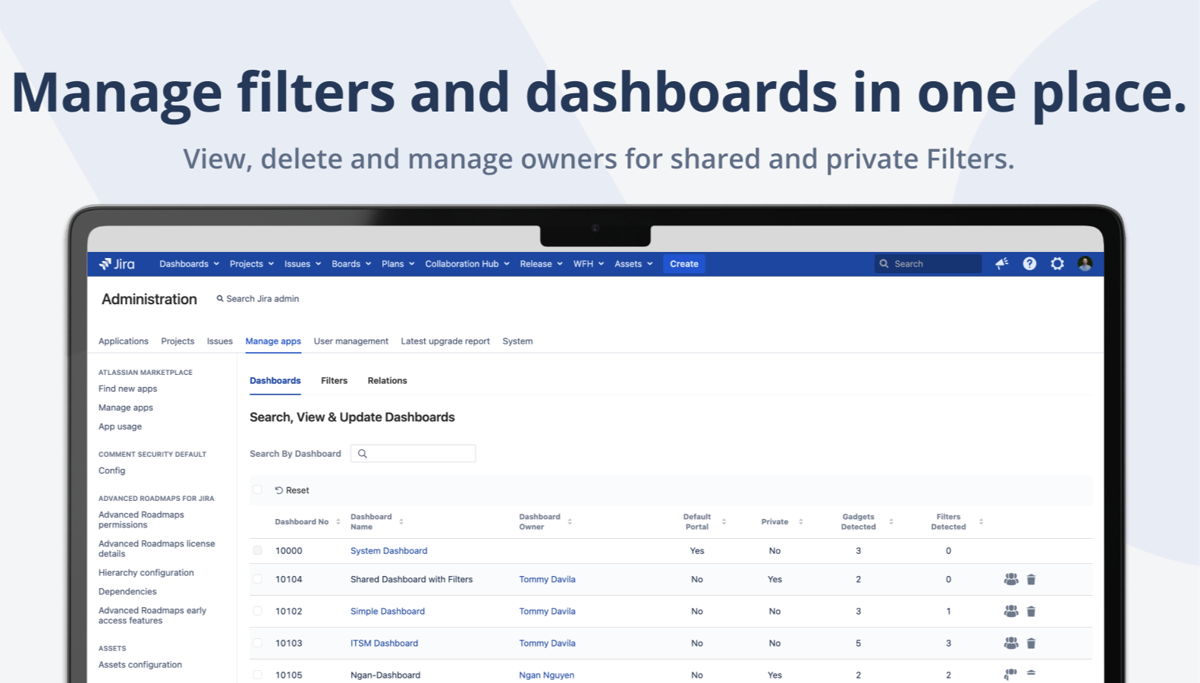
See Everything, Manage Everything
Get a complete view of every filter and dashboard in your Jira instance — including private ones that admins normally cannot see. Search, filter, and manage ownership from one screen.
- View ALL dashboards and filters (even private)
- Search by owner, name, or project
- See filter-to-dashboard relationships
- Identify orphaned and unused items
Ownership Management
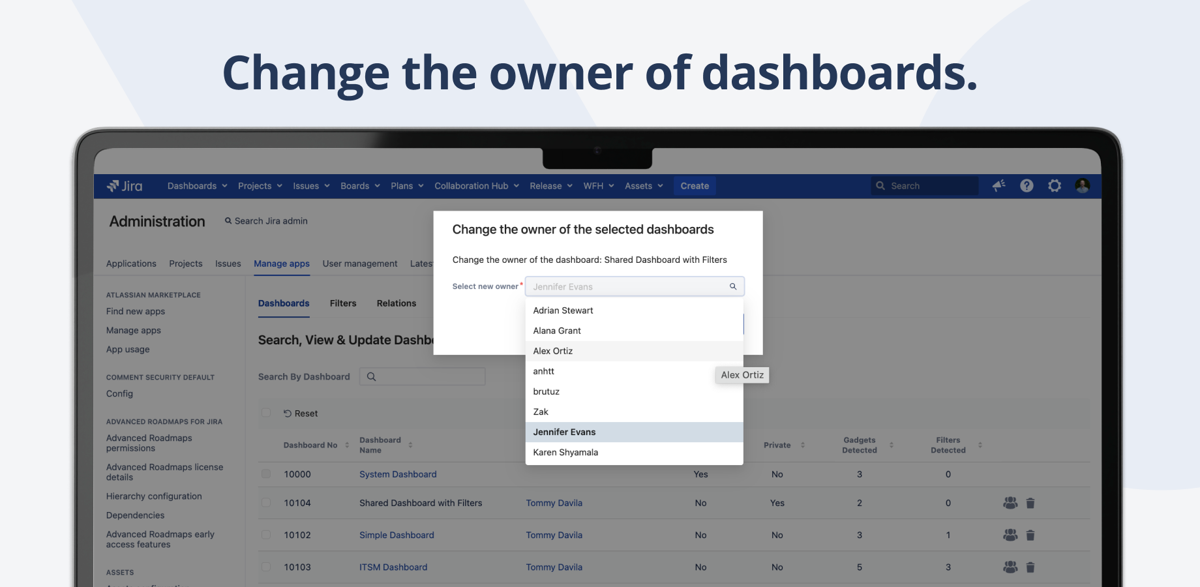
Bulk Change Owners Instantly
When team members leave, their filters and dashboards become orphaned. Reassign ownership in bulk — select items by the departing user and transfer to a new owner in one action.
- Bulk reassign filters and dashboards
- Temporary ownership for auditing
- Filter by current owner
- Full audit logging of changes
Cleanup & Audit
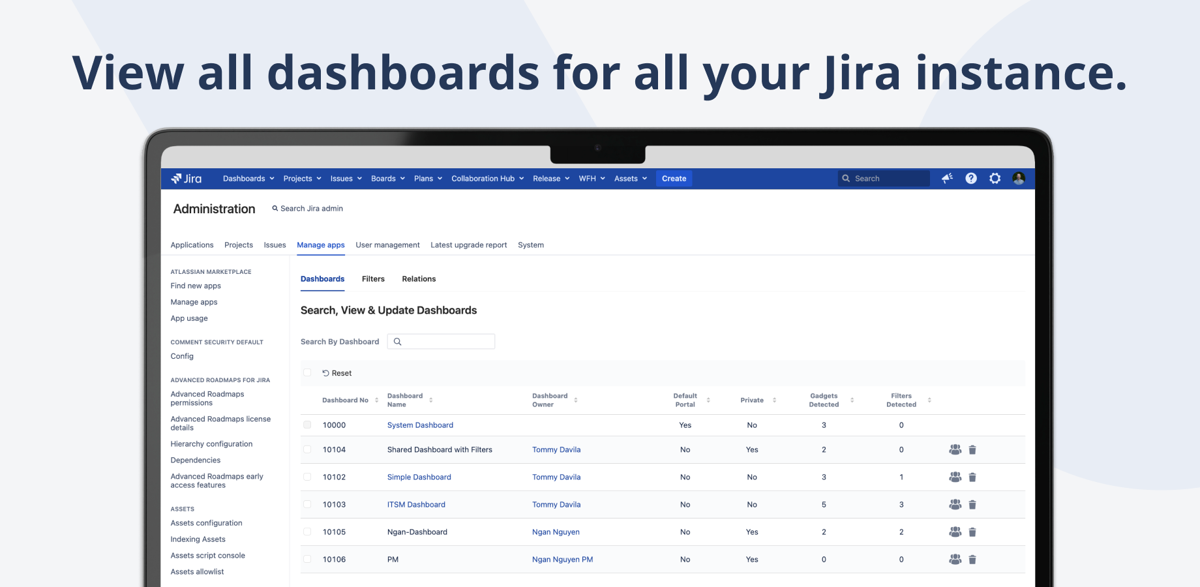
Find and Remove Unused Items
Over time, Jira accumulates hundreds of unused filters and dashboards. Identify which ones are orphaned, see dependency relationships, and safely clean up without breaking active dashboards.
- Filter-dashboard dependency mapping
- Identify orphaned filters safely
- Delete unused items in bulk
- Gadget visibility controls
Why Admins Switch to Filter & Dashboard Manager
Without This App
- Cannot see private dashboards or filters
- No way to find which dashboards use a filter
- Changing ownership requires database queries
- Offboarded users leave orphaned items behind
- No audit trail for filter/dashboard changes
- Deleting a filter might break unknown dashboards
With Filter & Dashboard Manager
- Full visibility into ALL filters and dashboards
- Filter-to-dashboard relationship mapping
- Bulk ownership changes in one click
- Automatic orphan detection
- Complete audit logging
- Safe deletion with dependency checking
Everything You Need
Private Dashboard Access
View all dashboards including private ones. No more blind spots in your Jira admin work.
Relationship Mapping
See which dashboards use which filters. Never accidentally break a dashboard by deleting its filter.
Bulk Owner Change
Reassign filters and dashboards when team members leave. Select by user and transfer in one action.
Unused Item Cleanup
Find and delete orphaned filters and dashboards. Keep your Jira instance clean and performant.
Audit Logging
Full audit trail of all ownership changes and deletions. Meet compliance requirements with detailed logs.
Gadget Visibility
Control which gadgets are visible on dashboards. Manage access without changing dashboard ownership.
Ready to take control of your Jira dashboards?
Try free for 30 days. No credit card required.
Start Free Trial on MarketplaceSimple, Transparent Pricing
Jira Data Center · Annual subscription · 30-day free trial · No credit card required
| Users | Price/year |
|---|---|
| Up to 50 | $2,500 |
| Up to 100 | $3,000 |
| Up to 250 | $4,000 |
| Up to 500 | $4,500 |
| Up to 750 | $4,500 |
| 750+ | Contact us |
Frequently Asked Questions
Can I really see private dashboards?
Yes. Filter & Dashboard Manager gives Jira admins visibility into all dashboards and filters, including those marked as private by their owners. This is essential for administration and cleanup tasks.
How does bulk ownership change work?
Filter by a user (e.g., someone who left the company), select all their filters and dashboards, and reassign them to a new owner in a single action. The original sharing settings are preserved.
Is there an audit trail?
Yes. Every ownership change, deletion, and modification is logged with timestamps and the admin who performed the action. This audit trail is available for compliance and troubleshooting.
How do filter dependencies work?
The plugin maps which filters are used by which dashboards (as gadget data sources). Before deleting a filter, you can see exactly which dashboards would be affected, preventing accidental breakage.
Which Jira versions are supported?
Jira Data Center. We test and release updates within days of new Jira versions to ensure compatibility.
Is there a free trial?
Yes, 30 days on the Atlassian Marketplace. No credit card required. Full access to all features.
Need help getting started?
Complete user guide, installation steps, use cases, FAQ and reference for Filter & Dashboard Manager for Jira.
Read the Documentation →Take Control of Your Jira Dashboards
Join 122+ teams using Filter & Dashboard Manager. Start your free 30-day trial.
Start Free Trial on Marketplace