Who changed the labels last week? How to get Jira’s change history for a whole project

Somebody changed the labels of a work item, and nobody remembers who or when. Jira has the answer, but it keeps it one work item at a time. Here is where it is, where search stops, and how to check your own project in ten minutes.
See Issue History for Jira on the Atlassian Marketplace
The short version
- Jira keeps the history of a work item in its Activity section, filter History. It is one work item at a time.
- Jira search has the CHANGED operator. It works with six fields only: Assignee, Fix Version, Priority, Reporter, Resolution and Status. It returns work items, not changes.
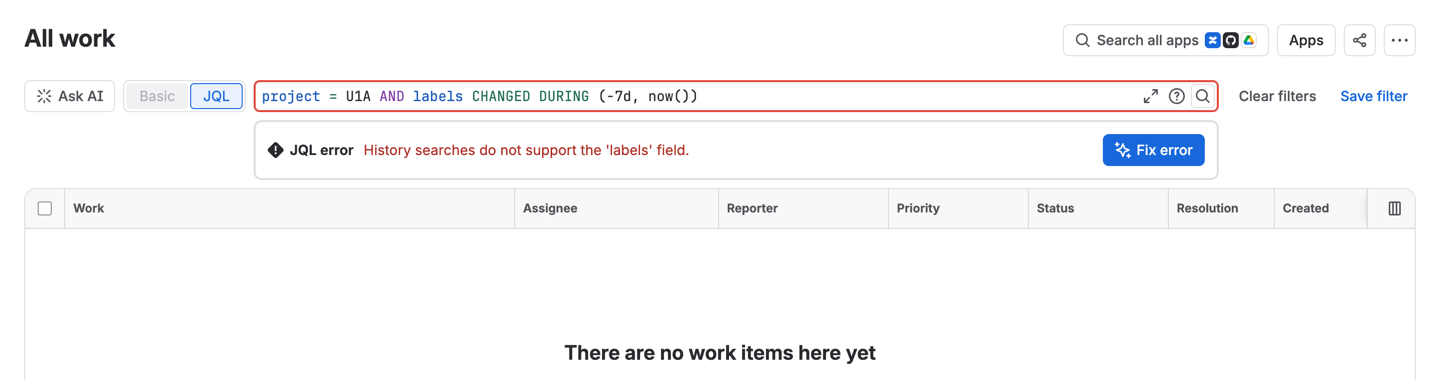
- So “who changed the labels of anything in this project last week” has no JQL search.
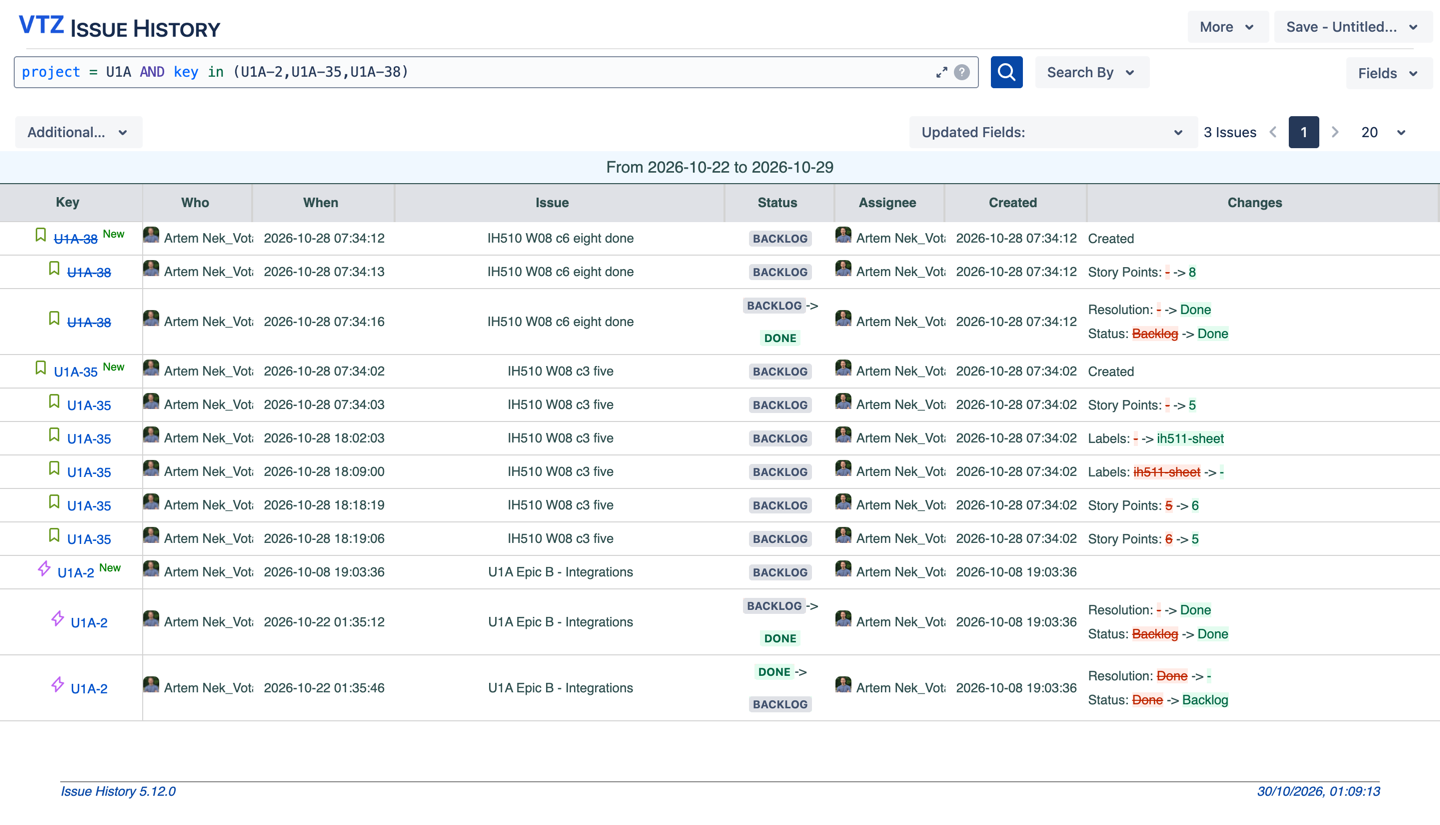
- Issue History for Jira lists the changes of a whole project for a period in one table, and exports it to CSV.
Where Jira keeps changes
Atlassian describes the History filter in the Activity section like this:
“History: Updates on a work item, like when someone edits a field, moves the work item through its workflow, and more.”
Source: Atlassian, What are the different types of activity on a work item
That is the record for one work item, shown in that work item’s view.
Where search stops
The CHANGED operator finds work items by what changed in them. Atlassian’s page:
“The ” CHANGED ” operator is used to find work items that have a value that had changed for the specified field.”
and then:
“Note: This operator can be used with the Assignee, Fix Version, Priority, Reporter, Resolution, and Status fields only.”
Source: Atlassian, Advanced search reference, JQL operators
Two limits follow. Labels, sprint, components, descriptions and custom fields are not on the list. And even for the six fields, you get a list of work items, not a list of changes: who changed what, from which value to which.
Check your own project in 10 minutes
- Run
project = KEY AND priority CHANGED DURING (-7d, now())with your project key. Note how many work items come back. - Open one of them. Activity > History: find who changed the priority and when.
- Try the same question for labels:
project = KEY AND labels CHANGED DURING (-7d, now()). On our test site Jira answers with an error and an empty list (screenshot below). - Count how many work items you had to open to answer the question for the whole week.
Meet Issue History
Issue History for Jira is a Votazz app. Open Apps > Issue History, pick a project and a period, add the Changes column through Fields, and get one table of changes: the work item, the field, the old value and the new one, the author and the time.
What you can do in the report:
- Filter by Project, Sprint, Fix Version, Issue Type, Status or Assignee, and by the date range of the changes.
- Filter by the author of the change, to answer “what did this person change”.
- Pick the fields you care about, for example Labels only.
- Open the history of a single work item in its own Issue History tab: in the work item’s Activity section, under More.
- Save the report, share a link, put it on a dashboard, or export it to CSV, which opens in Excel.
Issue History for Jira has a free trial on the Atlassian Marketplace.
The bottom line
In the work item view, Jira shows changes one work item at a time, and its search finds only six fields. Before the next audit or retro, run the ten-minute check and see how many work items you opened for one answer.
Sources
- Atlassian, What are the different types of activity on a work item.
- Atlassian, Advanced search reference, JQL operators.
- Votazz, Issue History documentation.
Issue History for Jira is a Votazz app. Atlassian, Jira and Marketplace are trademarks of Atlassian.